
Most developers enjoy working on exciting new projects and technologies. It is not only because of the sense of ownership and freedom but it is also about not trudging through old, badly written code filled with technical debt issues no one wants to deal with because they are so dreary. That said, I find satisfaction in looking at an existing system, with all the constraints it entails. And like a detective story, I try to figure out what went on in the previous developer’s mind when they wrote the code that I am now staring at. In fairness, that previous developer is often six-month-ago me, who thought he was very smart when he wrote that code.
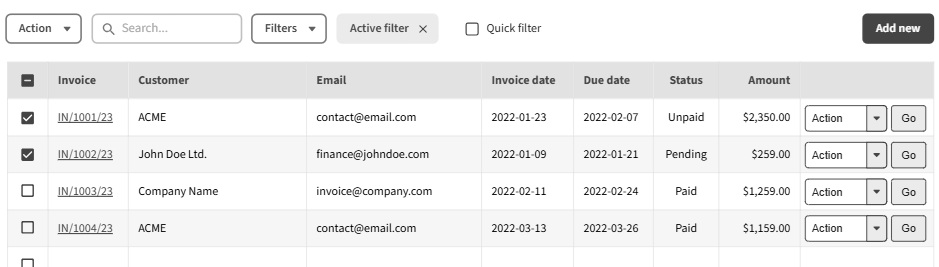
A while back a client had a page with a list of documents the user managed. Each row in the table had information about the document and three actions as links - Edit, Delete and Download (PDF). When the client wished to add a couple more actions, we realised the table became exceedingly wide. The design team suggested having a drop-down with the various actions to save space.
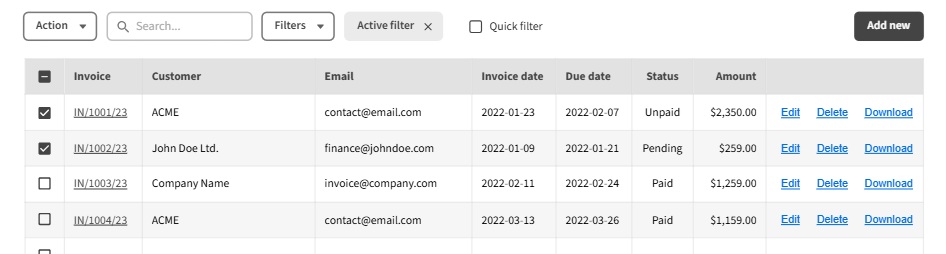
However, the application is a Python form-based application. This means that every action the user submits will cause the page to refresh for the changes to take effect. Previously the “Download” action was a simple link that opened the PDF in a new window. But as the page reloaded, how can we trigger the opening of the new window?
A simple solution would be to include a small inline JavaScript that will trigger the opening of a new window with the PDF. However, the client had an extremely strict security policy, prohibiting inline scripts for security reasons, so that would not work. We produced a different solution - we used a hidden iframe element which triggered the download. The solution seemed great and worked well. However, QA picked up an unexpected issue: If the user downloaded the file and immediately refreshed the page, the form action “download” would be resubmitted, and the PDF would automatically download again. We considered automatically refreshing the page without the auto-download but this had a few issues – it relied on the file being downloaded properly; and it uses a meta-refresh tag which is a big “no-no” in terms of accessibility as the user won’t understand why the page is being refreshed.
We decided to go back to the JavaScript-based solution: catch the form submission event, cancel it, and trigger a download event using the JavaScript (creating a link to the PDF and firing it without ever adding it to the page). It is not the perfect solution as it will leave the 5% of internet users who cannot use JavaScript with the current shoddy iFrame solution, but at least it will improve the experience of the other 95% of the users.
But it did not work. The event listener simply ignored the event when it fired, and the page kept refreshing (making it a pain to debug, as it kept resetting the console). Could it be that the strict content security policy (CSP) prevented writing onclick events? It killed any inline coding attempts with appropriate warning errors. But I could not find any indication that event listening was forbidden.
I needed to find a way to isolate the problem, so I added my own button to the page. Clicking it produced an error message that this button should be inside a form. But why was JavaScript complaining about it?
It turned out that the system user had a bad habit of double-clicking buttons (picked up from the old desktop version of the product) and for a Python application, it caused the form to be submitted twice. The user would get to see the result of the second submission, which failed as “The form was already submitted.” The crude solution for this problem was to catch any form submission, cancel the event, turn the clicked button into a hidden field, disable all the buttons, and submit the event again. The reason for the hidden field is because disabled buttons’ values are not being sent as part of form submission.
It was this piece of code (adding the hidden field to the button’s form) that triggered the error in my experimental button and that is how I found it. It is worth pointing out that the product barely relies on JavaScript; it is using webpack to create a single file that is applied to every page in the system, including the “documents” I was now trying to fix.
At this point, the solution was easy – I replaced the “double-click-protection” with a simple debounce mechanism (which prevents sending events too frequently), allowing my event to still run properly and get caught by my own event listener.
Alternatively, I could’ve added a condition to the “double-click-protection” code to check if the button has an attribute double-click-protection="false"; add that attribute to my button that I can now listen to using JavaScript and send the PDF, as I originally planned. It would have been a simpler, safer way to do it (less breaking of existing code), but I felt it would just a patch over another instead of actually solving the problem.
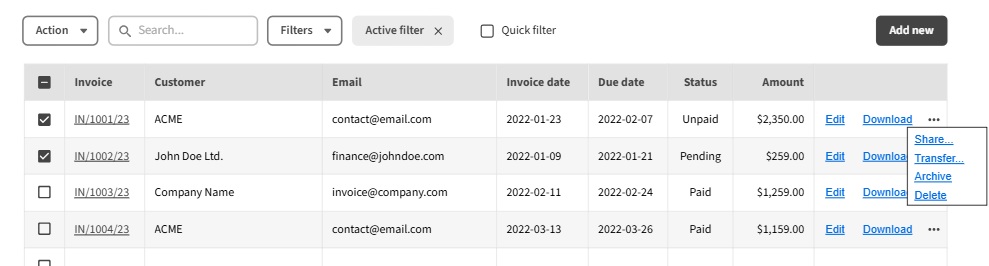
Another suggestion we have considered was to use HTML-based summary/details elements to show/hide the secondary actions, thus eliminating the need for JavaScript. Unfortunately, the design team was not in favour of this solution due to time constraints on their part.
There is a key takeaway about the difference between form-based applications (server-side rendering for that matter) and web-based applications. The former is extremely limited in its capabilities, and I can see why designers would find it too restricting. Personally, I find that it forces a certain simplicity that is healthy for code maintenance as well as the user’s mental model.
The landscape of software development is constantly changing, with modern technologies, frameworks, and methodologies. This, as I have mentioned in the past, can be quite overwhelming for junior developers. I hope that this experience I have shared gives a better view on the type of problems we are dealing with. As developers, we are required to understand the client needs and produce the best software, regardless of the tech stack.